A podcast RSS feed is a unique link that contains all your show’s information: your episodes, artwork, title, and description.
When you submit it to Spotify, Apple Podcasts, or any other directory, they use it to pull your episodes automatically every time you publish. In short: one RSS feed, every platform updated instantly.
Here’s how to create your podcast RSS feed for free with RSS.com in four steps. No coding or technical experience required.
Do I Need a Podcast-Only Feed?
Yes. If you already have an RSS feed for your website, it won’t work for podcasting. Your site-wide feed may only be picking up blog posts, not podcast episodes.
You need a dedicated podcast RSS feed to submit your show to Spotify, Apple Podcasts, YouTube, Amazon Music, and other major directories. Without one, those platforms can’t find or list your show.
How to Create a Podcast RSS Feed
The good news is that creating your podcast-only RSS feed is easy and only takes a few minutes.
Here are the four steps needed to create your new feed:
Step 1. Create a free RSS.com account (no credit card required)
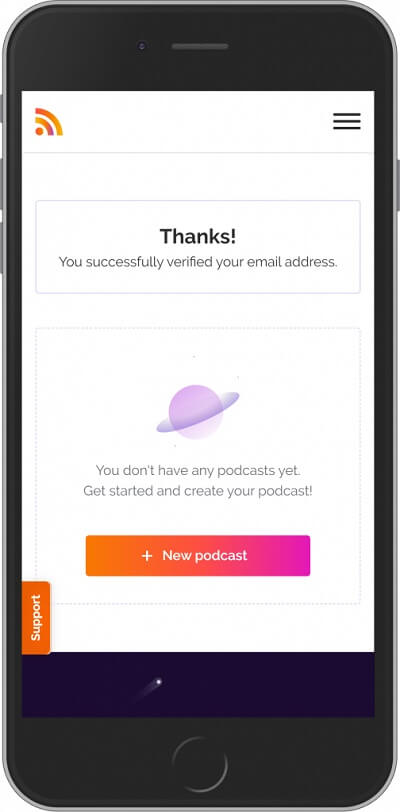
Step 2. Confirm your email address and click “New podcast”
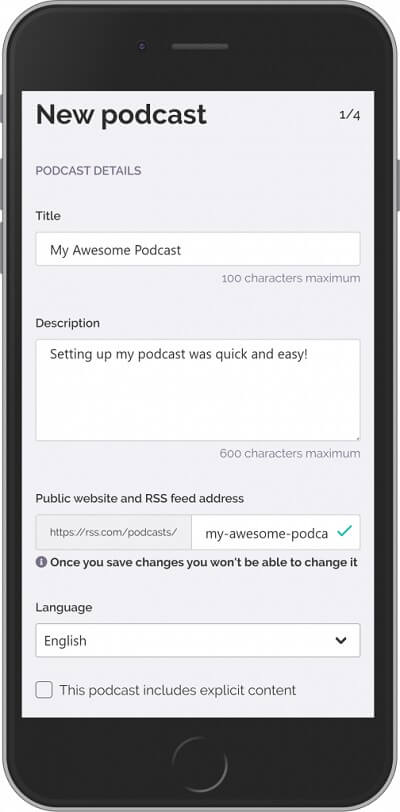
Step 3. Next, add your podcast’s title, description, and RSS feed, then click “Next” Easy right?
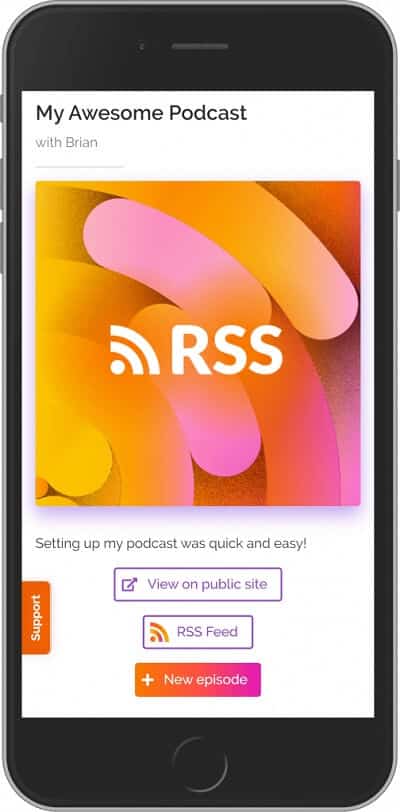
Step 4. Add your author details, choose up to three categories, upload your cover art, and click “Save and finish.” That’s it. Your RSS feed is live.
Click the “RSS Feed” button in your dashboard to copy your feed URL. You’re ready to submit to directories.
Congrats, you’re done!
Below are images to guide you through each step:
Step 1. Create your free account.
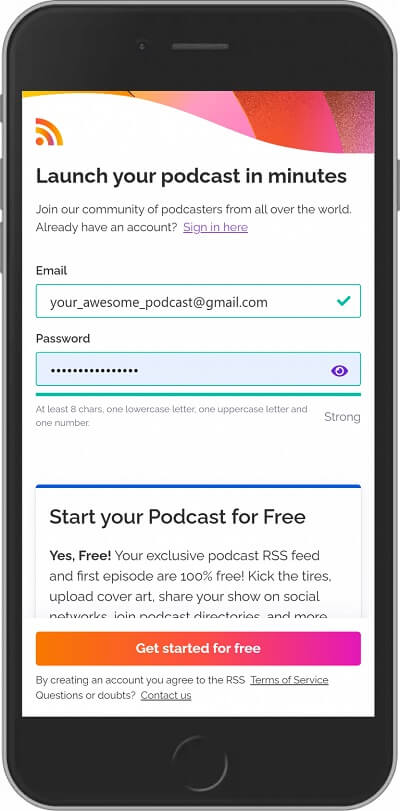
Step 2. Confirm your email address and select the “New podcast” button to create your podcast.
Step 3. Now you are ready to add your new podcast’s title, description, and RSS address feed.
Step 4. Next, add your author details, podcast categories (up to three), and your podcast cover art and select “Save and finish.” Click the “RSS Feed” button to copy and paste your podcast’s RSS Feed. Congrats, you’re done!
Submit Your Podcast and Get Discovered
Now that you’ve created your RSS feed, submit it to the major podcast directories so listeners can find your show:
- How to submit your podcast to iTunes/Apple Podcasts
- How to start a podcast on YouTube
- How to submit your podcast to Spotify
- How to submit your show to Stitcher
- How to submit your podcast to iHeartRadio
- How to submit your podcast to TuneIn
- How to submit your show to Pandora
- How to submit your podcast to Amazon Music & Audible
🎬 If you’re a visual learner, check out our video on podcast RSS feeds, what they are and how to get one:

Why Use RSS.com for Your Podcast RSS Feed?
RSS.com gives you everything you need to start, grow, and make money from your podcast. Every account includes:
- Unlimited episodes and audio storage
- One-click distribution to Spotify, Apple Podcasts, Amazon Music, YouTube, and more
- IAB-certified analytics you can trust
- Built-in monetization with programmatic ads (starting at just 10 downloads), Apple Podcasts Subscriptions, donations, and Value for Value
- A free podcast website and embeddable player
- AI-powered transcripts in 14 languages on paid plans
Start completely free with our Local & Niche plan, or use promo code FREE3MONTHS for three free months on any paid plan.
Why Choose RSS.com?
Get your podcast on every major platform – Submit to Spotify, Apple Podcasts, YouTube, Amazon Music, and more with one click. No manual uploads, no chasing down directories.
Start making money from your podcast – Turn on programmatic ads with as few as 10 downloads, set up Apple Podcasts Subscriptions, or accept listener donations. Most hosts make you wait. We don’t.
[See who’s actually listening](link to analytics feature page) — IAB-certified analytics that show you real numbers: downloads by episode, listener locations, listening times, and trends over time.
Turn your episodes into YouTube videos – Convert your podcast audio into video with PodViz and publish directly to YouTube from your dashboard. No editing software needed.
Pick the right plan for your show – Start free with our Local & Niche plan (unlimited episodes and audio) or grab three full free months on any paid plan usijng promo code FREE3MONTHS.
New to podcasting? Start here – Our step-by-step guide walks you through everything from recording your first episode to growing an audience.
How to Choose the Right Podcast Hosting Platform
There are a lot of podcast hosts out there and choosing the right host matters. In this video, we break down what to look for so you can make the best decision for your show: