
Podcasters are always looking for the right AI tools to help us work faster and see better results.
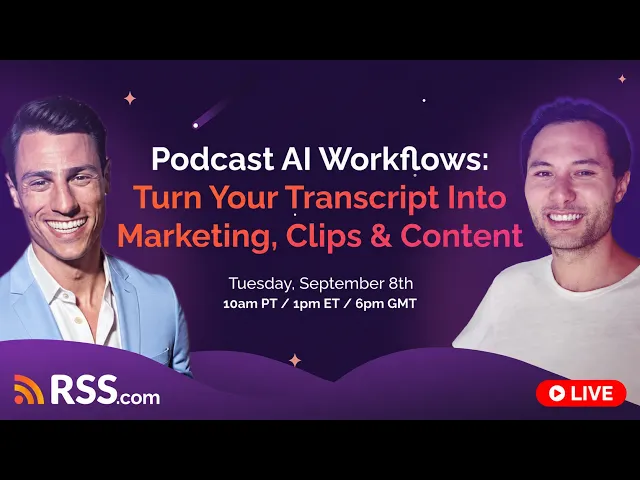
We hosted this free live training on September 8th with Greg Wasserman, Head of Relationships at RSS.com, and Blaine Bolus, Co-founder of Castmagic. Below, you’ll find the key takeaways broken down by topic, so you can jump straight to what matters most to you.
Prefer to watch the replay? Check out Podcast AI Workflows: Turn Your Transcript Into Marketing, Clips & Content below:
What This Training Covered
Recording a podcast episode is only part of the work. Once it’s done, you’ll still need to write the title and description, find clips, create promotional content, and give your guest something they can share.
Your transcript gives you a detailed record of the conversation. It’s a strong starting point for everything that comes after the recording.
Every paid RSS.com podcast includes a free transcript. Greg and Blaine walked through exactly how to turn that transcript into title and description drafts, social posts, guest assets, and more, using AI tools you likely already have access to.
Getting Your Free Transcript on RSS.com
Greg opened with a quick tour of the transcript settings inside RSS.com’s paid accounts.
Here’s what you need to know:
- Go to Settings, then Manage AI Automatic Transcripts.
- Pick a transcript quality level: low, medium, or high. Higher quality takes more time but gives you a more accurate transcript.
- Turn on auto-accept transcripts so every new upload gets transcribed without extra steps.
- As a rule of thumb, 30 minutes of audio takes about 15 minutes to transcribe.
Note: If you use RSS.com’s programmatic ads (PAID), your timestamps may shift slightly once an ad gets inserted into the episode.
Once your transcript is ready, you can copy it into ChatGPT, Claude, Gemini, or any AI tool and start asking it to write content for you.
Related: Check out our free podcast transcript generator.
Write Stronger Titles and Descriptions
Greg’s biggest takeaway from the whole session: your title and description are doing more work than you think, and most podcasters are not using the space they have.
On RSS.com, you get up to 250 characters for your episode title and 4,000 characters for your description. Greg’s advice is simple: use as many of the characters as you can to get the most mileage possible from both.
A few things to include in your show notes:
- A clear hook that tells people why this episode matters
- Who your guest is and why their perspective is worth hearing
- Chapters or timestamps so listeners can jump to what they care about
- Links to your guest, your sponsors, and yourself
Greg pointed out that a lot of podcasters copy the style of huge shows like Diary of a CEO. The problem is those shows can lean on a famous host’s name alone to get the click.
If you’re just starting out, your name isn’t the draw yet. To get new listeners to click through, your title and description need to be more convincing.
Blaine added that this is also an SEO and AI discoverability issue, not just a listener issue. AI search tools pull from show notes and transcripts to recommend podcasts to people asking related questions. A thin description means AI tools have less to work with when deciding whether to point someone toward your show.
Turn One Transcript Into Many Pieces of Content
Once you have a transcript, you’re not limited to titles and descriptions. Both Greg and Blaine walked through how one recording can become:
- Blog posts
- Episode intros and outros written in your own voice
- Social captions
- Newsletter content
- Quote graphics and pull quotes
- Interview questions for future episodes
- Feedback on your own hosting or interviewing style
Blaine described this as building a set of repeatable jobs. Once you know what you want out of each transcript, whether that’s a set of pull quotes or a first draft blog post, you can set that up once and run it every time you upload a new episode.
Give Your Guests Content They Can Actually Use
If you run an interview-based show, this can be the difference between guests who promote your show, and ones that don’t.
Greg’s approach is to send guests a ready-made set of promotional content as soon as the episode goes live. That includes a podcast appearance announcement, a first-person guest blog post draft, and LinkedIn promo copy, all written from their own transcript.
This works because most guests won’t write their own promo content. They already gave you their time. Handing them a draft they can tweak and post removes the biggest reason guests skip promoting their appearance.
Build Clips, Audiograms, and Image Carousels
Blaine showed how tools like Castmagic (an RSS.com partner) can turn a single recording into an audiogram, a swipeable image carousel, or a clip, without needing separate design or editing software. You can pick from AI-suggested highlight moments or choose your own, then adjust colors, fonts, and templates before exporting.
Also see our partners page for complimentary services, and exclusive discounts and deals.
Chat With Your Whole Episode Library
Once you’ve built up a catalog of episodes, you can connect your transcripts to a tool like Magic Chat or Claude and ask questions across every episode at once.
Greg gave an example: “What do podcast network operators say are the best practices for podcasters?” pulled from six different interviews at once, with sources cited.
This is also how Castmagic built a 100-page ebook from one podcast’s back catalog, using Claude connected directly to their transcript library.
New Features Worth Knowing About
Two features launched within the Castmagic platform the week of this training:
- Asks: Type in a topic, and it generates interview questions you can send to guests as an async, self-recorded interview. No live call needed.
- Audience Chat: A chat widget you can embed on your own website so visitors can ask questions and get answers pulled from your entire episode library.
RSS.com also recently added a voicemail feature, letting your audience send you a short voice message directly, another way to build engagement around your show.
Start Small
If all of this sounds like a lot, Blaine’s advice was to start with one thing: better show notes.
Once that feels manageable, pick the next piece of content, whether that’s a newsletter, one LinkedIn post a week, or guest promo assets.
You don’t need to build the whole system on day one. You can learn as you grow.
Try it with your next episode, and start creating better content for your podcast.