Beaver Tools
by Chris AhrweilerEdit Photo Metadata on Mac
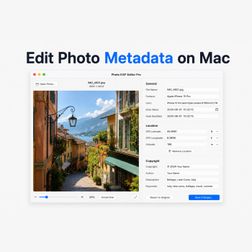
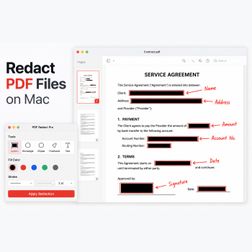
A photo file contains more than the image. It can include camera data, timestamps, GPS location, copyright fields, software tags, and other metadata. Photo EXIF Editor Pro gives you a focused way to inspect and edit that information before you share, publish, archive, or send the photo. Use Photo EXIF Editor Pro when one image needs its metadata checked. Edit the fields you need. https://medium.com/@chris.ahrweiler/edit-photo-metadata-on-mac-d2b889821d59Preview can handle many PDF tasks. PDF Redact Pro is built around that one job. A redaction task is usually not about editing the whole PDF. It is about hiding the parts that should not be visible before the document is shared. Confidential paragraphs. Details in scanned pages. PDF Redact Pro keeps the workflow direct: select the areas, apply redaction, and export a clean copy. Preview is great as a general PDF viewer and quick annotation tool. https://medium.com/@chris.ahrweiler/redact-pdf-files-on-mac-ea8847e11cb1 Fill Free Disk Space on Mac
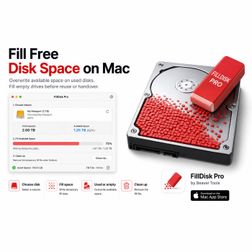
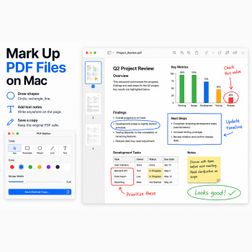
Deleting files does not always mean the old data is gone. FillDisk Pro writes temporary data into available disk space, then optionally removes it again when the job is done. Use it on a used volume to overwrite free space, or on an empty drive to write over the drive before you reuse, archive, or hand it over. Fill the available space. Optionally remove the temporary fill files. No complicated disk tools. Just a focused local workflow for filling available disk space. https://medium.com/@chris.ahrweiler/fill-free-disk-space-on-mac-a5b4cc30b007Sometimes a PDF does not need editing. A circle around an issue. A rectangle around an area. A line pointing to a detail. PDF Marker lets you annotate PDF files visually, without turning the job into a full PDF editing session. Use it when you want to point something out, review a document, mark a correction, explain a detail, or send feedback back to someone else. Draw shapes, lines, circles, rectangles, and text directly on the PDF page. PDF Marker runs locally on your Mac. https://medium.com/@chris.ahrweiler/mark-up-pdf-files-on-mac-57deae8bbc1d Is Your Mailbox Full? Duplicate Emails May Be the Reason
Your mailbox is full. But why? You delete large attachments, empty the Trash, and remove old newsletters — yet the account still uses much more storage than expected. The reason may be duplicate emails. Mail migrations, server changes, antivirus scanners, backup restores, and synchronization problems can leave multiple copies of the same message in an IMAP mailbox. These duplicates are often difficult to notice because your email client may group or hide them. https://medium.com/@chris.ahrweiler/is-your-mailbox-full-duplicate-emails-may-be-the-reason-eec271ca9b3dA Must-Have Capture Tool for Mac App Store Developers
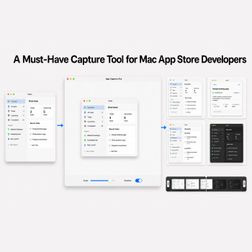
Create upload-ready screenshots and app preview videos without rebuilding the same workflow for every release Publishing an app on the Mac App Store involves much more than compiling the final build. Every new app and major update also needs presentation assets. You capture the interface, remove distracting surroundings, place it on a suitable canvas, export it at the correct size, and repeat the process for every screenshot. https://medium.com/@chris.ahrweiler/a-must-have-capture-tool-for-mac-app-store-developers-5154b8eb6c48A Fast Temporary Drive in Memory (RAM drive)
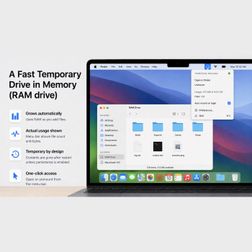
Builds, exports, caches, and test files can create a lot of temporary clutter. Most of it does not need to live on your SSD forever. It only needs a fast place to exist while you are working. A RAM drive is useful for exactly that. It behaves like a normal disk, but it lives in memory. You can copy files to it and write temporary output there. Because it is a RAM drive, the contents are gone after restart — unless you use RAMdrive Pro and enable persistence in settings! https://medium.com/@chris.ahrweiler/a-fast-temporary-drive-in-memory-ram-drive-d9a9d15afe3fMac Developers: Keep Your Development Disk Clean
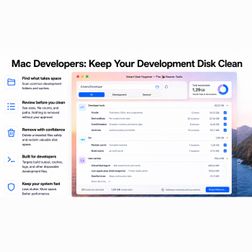
Development work creates files everywhere. Most of these files are not important forever. But they stay on disk, grow quietly, and eventually make your Mac feel messy. The problem is that developers usually know where the space went — but not always what is safe to remove. That is what Smart Disk Hygiene is for. Smart Disk Hygiene helps you inspect and clean common development clutter on macOS. It is designed for people who build, test, export, install packages, and run local projects. https://medium.com/@chris.ahrweiler/mac-developers-keep-your-development-disk-clean-7a2cd32ca38bMeasure What Is on Your Screen
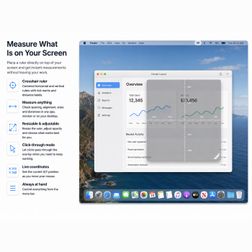
Design work often comes down to small distances. Is the spacing the same on both sides? How wide is that preview area? Where is the center of the screen? How far apart are these two elements? You can take a screenshot and open it somewhere else. You can use a design tool just to check a few pixels. Or you can place a ruler directly on top of your screen. That is what Screen Ruler Overlay is for. Screen Ruler Overlay is a lightweight on-screen ruler for macOS. https://medium.com/@chris.ahrweiler/measure-what-is-on-your-screen-7388f1a32c75Calculate Like on Paper — And Keep It Editable
A normal calculator is good for quick answers. But it is not great when you want to think through a calculation. You enter numbers, get a result, and then the context is gone. If you made a mistake, want to change one value, or need the same calculation again later, you often start from scratch. That is not how people calculate on paper. On paper, you write things down. You keep the steps visible. You reuse what you already wrote. That is the idea behind Calc Pad Pro. https://medium.com/@chris.ahrweiler/calculate-like-on-paper-and-keep-it-editable-066c2dab42a6