So you’re already a podcaster and want to start another show – that’s great!
Maybe there’s another topic or niche you’d like to cover, maybe you’re looking to support a new business, maybe you want another show to try out new ideas and experiment with different formats.
In this post you’ll learn how to easily start another podcast from the same RSS.com hosting account.
Starting Your 2nd Podcast
Now that you’re ready to start a second podcast, the good news is that hosting and switching between multiple shows underneath the same account is a breeze with RSS.com
✨ Don’t have an account with RSS.com – sign up for free here.
✨ Already hosting with another platform? We make transferring your show to RSS.com easy, plus you get six FREE months of hosting!
🚀 Easily transfer your podcast to RSS.com here.
Step 1. Log into your RSS.com account and navigate to your dashboard. In the top navigation, click the dropdown menu, then click “New podcast.”

Step 2. A pop up box will appear – select the “Create a new podcast” button.

Step 3. If you’ve already signed up under our ‘All-in-One Podcasting’ plan, you can upgrade to the Podcast Networks plan. Your fee will increase to just $18.75/month with annual billing or $24.99/month with month-to-month billing.
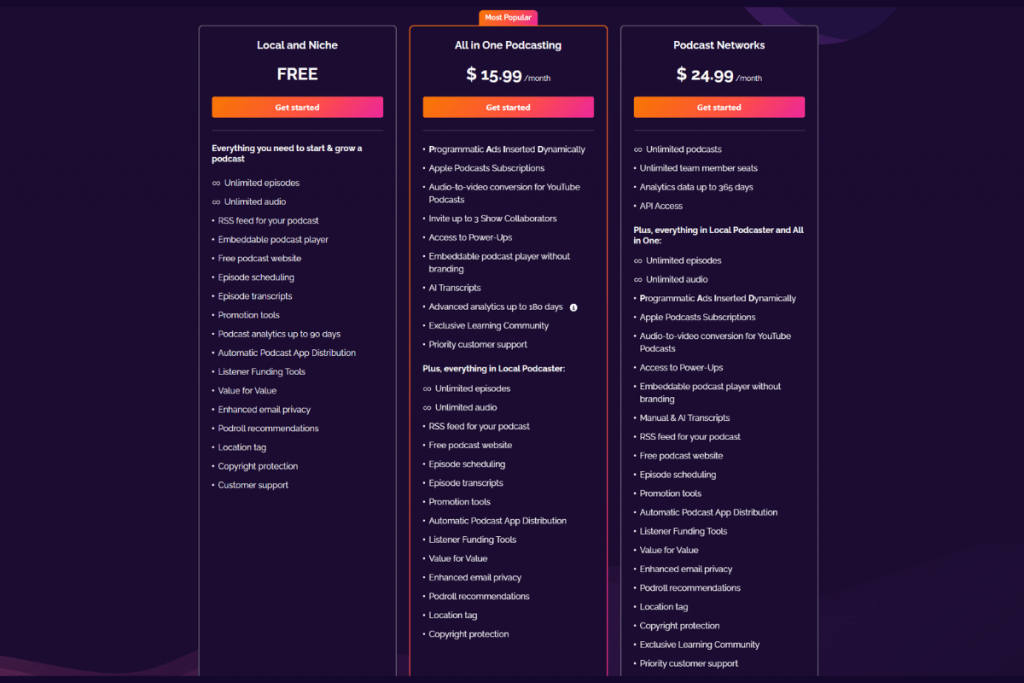
Step 4. Once you’ve upgraded to our Podcast Networks plan, you’ll be able to add a new show in your existing RSS.com account.

After you’ve set up a second, third or even fourth show, you can easily switch between your different podcasts directly from your RSS.com dashboard.
One login. One dashboard. Multiple podcasts!

Step 5. Get to 10 downloads and start getting PAID!
We know running a podcast takes tremendous effort, which is why we want you to get PAID for that hard work.
RSS.com’s new programmatic advertising feature automatically monetizes your show through intelligent ad placement. Whether you’re just starting out or already established, PAID gives you access to ad inventory from across the US and worldwide.
The best part? You can enable it with a single click in your dashboard. Learn all about PAID here!
🎉 Congrats, you did it!