Beaver Tools

Beaver Tools

di Chris Ahrweiler

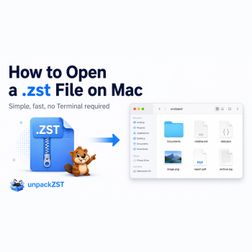
How to Open a .zst File on Mac

IA
You downloaded a file ending in.zst or.tar.zst, double-clicked it on your Mac, and nothing useful happened. macOS can open ZIP files directly, but Zstandard files are still not handled like normal Finder archives. So when you receive a.zst file from a server, backup system, Linux package, developer tool, or data export, you need another way to extract it. A.zst file is compressed with Zstandard, often shortened to Zstd or ZST. A plain.zst file usually means one compressed file. https://medium.com/@chris.ahrweiler/how-to-open-a-zst-file-on-mac-dd9fa1ef29a5

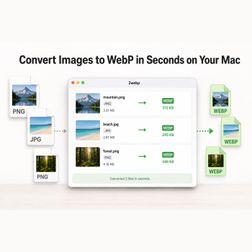
Convert Images to WebP in Seconds on Your Mac

IA
WebP is now a standard part of modern web development. It produces substantially smaller files than traditional formats such as JPEG and PNG while maintaining excellent visual quality. The format is easy to use once the image has been converted. The annoying part is often the conversion itself. https://medium.com/@chris.ahrweiler/convert-images-to-webp-in-seconds-on-your-mac-e39d3b21bc5a

How to Check If Your VPN Is Actually Working

IA
Most people turn on a VPN and assume everything is fine. The VPN app says “connected”, the icon looks active, and the tunnel appears to be running. But that does not always mean your traffic is really leaving through the VPN. The important question is not whether your VPN app thinks it is connected. The important question is what the internet actually sees. https://medium.com/@chris.ahrweiler/how-to-check-if-your-vpn-is-actually-working-05db97432326

Transfer Android Files to Mac Without the Cloud

IA
Moving files between an Android phone and a Mac should be simple. But in practice, many users end up using cloud storage, messenger apps, or temporary upload links just to move a few files. For large videos, folders, screenshots, downloads, or private documents, that is often unnecessary. A USB cable is still the cleanest solution: local, direct, and without uploading anything. https://medium.com/@chris.ahrweiler/transfer-android-files-to-mac-without-the-cloud-50dcc5cbf12e

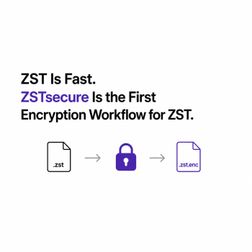
ZST Is Fast. But What About Encryption?

IA
Zstandard, or ZST, is a modern compression format: fast, efficient, and usually smaller than ZIP. That makes it great for backups, project folders, exports, logs, datasets, and other files that are compressed and unpacked often. It was built for compression, not for password-protected archives. With ZIP or RAR, encrypted archives are familiar. You choose files, set a password, and create an archive that is compressed and protected. https://medium.com/@chris.ahrweiler/zst-is-fast-but-what-about-encryption-f1ba36ad993b

Your Cloud Storage Is Not Really Yours

IA
Cloud storage is convenient. That is why we use it. iCloud Drive, Google Drive, Dropbox, OneDrive — they make files available everywhere and easy to share. Your files are stored on someone else’s infrastructure. That means you are trusting the provider, its servers, its rules, its country, and its legal obligations. Large cloud providers receive government requests for user data. This is not theoretical; companies like Apple and Google publish transparency reports about these requests. https://medium.com/@chris.ahrweiler/your-cloud-storage-is-not-really-yours-be7b3abb50ce

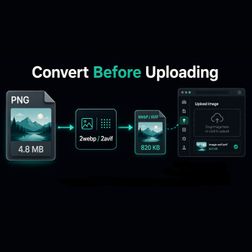
Convert Images Before Uploading: Why I Use WebP and AVIF

IA
Large images are one of the easiest ways to make a website heavier than it needs to be. PNG is useful, especially for graphics, screenshots, UI images, and transparency. But PNG files can also become large very quickly. For websites, that often means slower uploads, more storage use, more bandwidth, and slower pages. That is why I increasingly use WebP and AVIF. https://medium.com/@chris.ahrweiler/convert-images-before-uploading-why-i-use-webp-and-avif-9d4cdead4c36

What Is a Download Hash and How Do You Verify It?

IA
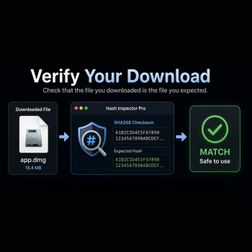
When you download software, disk images, archives, or large files, you sometimes see a strange-looking string next to the download link. A hash is like a fingerprint for a file. If the file changes, the hash changes too. That makes hashes useful for checking whether a downloaded file is really the file you expected. A download can be damaged, incomplete, replaced, or modified. https://medium.com/@chris.ahrweiler/what-is-a-download-hash-and-how-do-you-verify-it-7debe8245f0d

What Hidden Metadata Are You Sharing?

IA
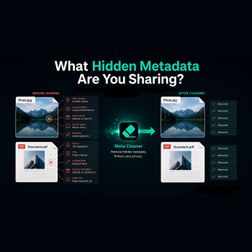
Sharing a file is not always just sharing the visible content. A photo is not always only the image. A PDF is not always only the document. Many files also contain metadata: extra information stored inside the file. For images, this can include camera model, date and time, GPS location, device name, or the software used to edit the file. For PDFs, it can include author name, creator app, producer software, creation date, modification date, and other document information. https://medium.com/@chris.ahrweiler/what-hidden-metadata-are-you-sharing-db2e74667cde

Why I Switched to ZST Compression

IA
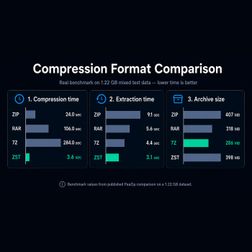
I recently started using ZST compression more often, and the reason is simple: it is fast. The comparison in the graphic shows it clearly. ZST is not the smallest archive format — 7Z usually wins there — but ZST is much faster when compressing and extracting files. In everyday use, that matters. ZIP is still useful because everyone can open it. But ZIP is mainly the compatibility format now. If I send files to someone and I do not know what system they use, ZIP is still the safe choice. https://medium.com/@chris.ahrweiler/why-i-switched-to-zst-compression-7c13907e12b5
3 di 11