Registrati gratis
Funzionalità
Risorse
Prezzi
Podcasts
Registrati gratis
Accedi
NotebookLM Slide Deck 2026
di NotebookLM-Guide.com All Workflow Guides 59 Guides · 1,000+ Prompts
Come fare
Feed RSS
Ascolta su
Condividi
Episodi
Dettagli
Stagione 1
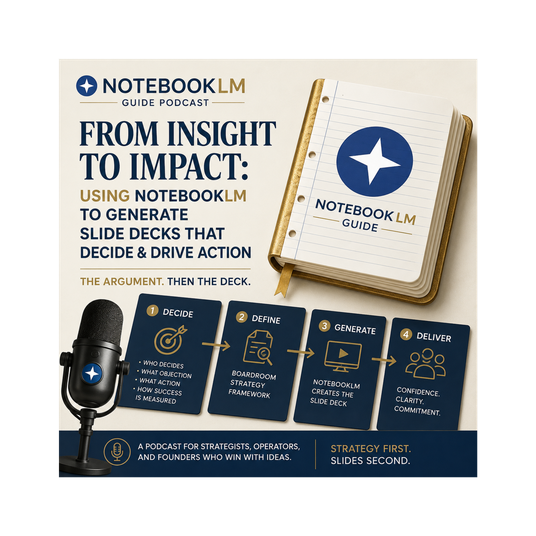
NotebookLM Slide Deck Strategy 2026: Generate slides as your argument ships. From Sources to Boardroom Wins: The New 2026 NotebookLM Slide Deck Strategy Framework
IA
NotebookLM can generate a full slide deck in ~90 seconds — but most people are doing it wrong. The real game-changer in 2026 isn’t faster generation — it’s strategy before tactics. Today: The 4-Decision Framework that turns generic AI decks into argument weapons that drive real decisions. Core Philosophy “You are not generating slides. You are generating arguments. Slides are how the argument ships.” Stop treating NotebookLM like a fancy PowerPoint tool. Treat it as a strategic briefing engine grounded in your sources. 🛠 The Boardroom Brief Generator (Featured Free Prompt) Best prompt on the page — Use this before generating any slides. Role: Strategic editor preparing a deck brief Output: 7-section strategic brief 7 Sections: The Decision Being Asked For — One concrete action/decision (approve budget, sign partnership, etc.) The Audience Tension — Main objection they’ll raise in the first 60 seconds The Evidence Arsenal — Top 3 strongest pieces of evidence from sources The 7-Slide Spine — Tight structure with action-oriented headlines The Opening Move — Surprise number, reframe, or question The Closing Close — Exact call-to-action line Pre-Mortem — Likely failure mode + fix Pro Tip: End the prompt with “Generate the deck now” only if the brief is strong. The 4 Strategic Decisions (The Framework) Decision 1: Who is the deck for? (Tone, density, visuals) Executive boardroom → Use Trinity Engine (high visual polish) Internal review → Instant Generation Client deliverable → Advanced Workflows Education/Training → Iterative with Pencil UI Decision 2: What action does it need to drive? Decision (approve / choose) Alignment (shared understanding) Education (new concept) Persuasion (future action) Decision 3: Detailed Deck or Presenter Slides? Detailed — Stand-alone, higher text (email, leave-behind) Presenter — Visual prompts, sparse text (live delivery) Often: Generate Presenter first, then Detailed as appendix Decision 4: One-shot or Iterative? One-shot: Clean sources + clear brief Iterative: High-stakes → Use Pencil UI for revisions Key Insights & 2026 Updates NotebookLM excels at evidence-heavy, citation-grounded decks (board updates, research presentations, regulatory briefings). Less ideal for pure vision/inspirational decks without strong sources. Generation = 10% of work. Revision = 90%. New features: PPTX export, Pencil UI per-slide editing, better visuals via Nano Banana Pro. Actionable Takeaways for Listeners Never generate slides without running the Boardroom Brief Generator first. Make the 4 decisions in <10 minutes before opening Studio. Use the strategic brief to create tighter, more persuasive decks. Combine with other tools (Trinity Engine for executives, Audio Overview for hybrid delivery). Download the free Boardroom Brief Cheat Sheet from notebooklm-guide.com