The Game Dev Blueprint (English)

The Game Dev Blueprint (English)

por Alankar Pradhan
Temporada 1
How to Make Open Worlds Feel Alive in Unreal Engine 5
IA
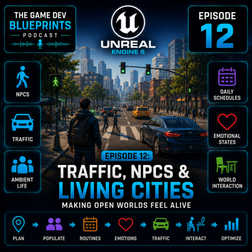
Welcome to a new episode of The Game Dev Blueprint! In our previous episode, we explored how open world games are built. Now it's time to focus on one of the most important ingredients behind believable worlds: Traffic, NPCs, and Ambient Life. Why do some open worlds feel alive and immersive while others feel empty and lifeless? The answer often comes down to the systems running behind the scenes that create the illusion of a living world. In this episode, we explore how developers can use Unreal Engine 5 to populate their worlds with believable traffic, pedestrians, and ambient behaviors without requiring massive teams or complex simulations. In this episode, you'll learn: Why traffic and NPCs are critical for making open worlds feel alive Common reasons open worlds feel empty and repetitive Simple techniques beginners can use to add ambient life quickly Creating basic pedestrian and traffic systems in Unreal Engine 5 How NPC routines and daily schedules improve immersion Using small behavior variations to make crowds feel more natural Designing unique character traits without building complex AI systems How emotional states can influence NPC decisions and reactions Simulating personality differences across large groups of NPCs Creating interactions between NPCs and world objects Making cities feel populated without simulating every character in detail Optimization tips for handling large numbers of NPCs efficiently We also discuss practical examples of how developers use simple AI tricks, scheduling systems, spawning logic, and behavioral variations to create the illusion of a living city while maintaining good performance. Whether you're building a small town, a survival game, an RPG, or a large open-world project, this episode will help you understand how to make your environments feel more believable and engaging for players. By the end of the episode, you'll have a better understanding of how traffic systems, pedestrian behaviors, emotional AI, and environmental interactions work together to transform static levels into worlds that feel truly alive.
How Open World Games Are Made: Lessons from GTA 6
IA
Welcome to a new episode of The Game Dev Blueprint! With the highly anticipated release of Grand Theft Auto VI expected later this year, we're diving into one of the most fascinating topics in game development: How open world games are actually built. Massive cities, believable NPCs, dynamic traffic, immersive environments, and endless exploration may seem magical from a player's perspective—but behind the scenes, developers rely on clever systems, optimization techniques, and design tricks to create the illusion of a living world. In this episode, you'll learn: What makes an open world game feel alive and immersive How world design, missions, NPCs, traffic systems, and environmental storytelling work together Why developers don't simulate every character and vehicle at full complexity The secret behind creating believable living cities efficiently How AI behaviors, spawning systems, and level design create dynamic gameplay Designing roads, districts, landmarks, and mission hubs How traffic and pedestrian systems are structured in modern games The role of ambient events and world interactions Common beginner mistakes when attempting open-world projects Why smaller, focused worlds often create better experiences than massive empty maps Whether you're an aspiring developer, Unreal Engine enthusiast, or simply curious about how games like GTA create their immersive worlds, this episode provides a practical behind-the-scenes look at the systems that make open-world experiences possible. The goal isn't to build the next GTA overnight—but to understand the design principles and technical foundations that make these worlds feel believable.
Multiplayer Game Development in Unreal Engine 5: Networking Made Simple
IA
Welcome to a new episode of The Game Dev Blueprint! In this episode, we break down the fundamentals of multiplayer game development in Unreal Engine and explain networking concepts in a beginner-friendly way. If you've ever wondered how multiplayer games synchronize players, actions, and game states across different devices, this episode is the perfect starting point. We explore the core systems that power Unreal Engine's networking framework and show how to quickly create your first multiplayer prototype. In this episode, you'll learn: The basics of multiplayer game architecture Understanding Actor Replication and Component Replication What data should and shouldn't be replicated The difference between Listen Servers and Dedicated Servers How Unreal Engine handles multiplayer synchronization The role of Game Mode, Game State, Player State, and Player Controller Setting up a simple multiplayer game step-by-step Common networking mistakes beginners make and how to avoid them Debugging replication issues efficiently Blueprint-based multiplayer development When and why to use C++ for networking systems We also discuss practical project organization tips and recommended workflows that make multiplayer development easier to understand and maintain. Whether you're creating a co-op game, competitive multiplayer experience, or simply learning Unreal Engine networking, this episode provides a solid foundation to get started. Stay tuned for future episodes as we continue exploring advanced gameplay systems, multiplayer features, and production-ready Unreal Engine workflows.
Building Survival Systems in Unreal Engine 5: Health, Damage & UI
IA
Welcome to a new episode of The Game Dev Blueprint! In this episode, we dive into the core systems that power survival games in Unreal Engine, including player health, damage systems, survival mechanics, and UI feedback. Whether you're building a survival game, RPG, action-adventure title, or multiplayer experience, understanding how to manage player stats and damage is essential. We walk through a beginner-friendly approach to creating these systems using Unreal Engine 5 Blueprints. In this episode, you'll learn: How to create a reusable Damageable Component in Blueprints Setting up player health and damage systems step-by-step Applying and receiving damage using Unreal Engine's built-in framework Creating floating damage numbers for visual feedback Building health bars using UMG Widgets Binding health and damage events to UI widgets dynamically Updating player stats in real-time Creating simple survival mechanics such as:Health Hunger Thirst Stamina Energy systems Organizing gameplay systems for future expansion We also discuss practical Blueprint workflows, common beginner mistakes, and techniques used in commercial projects to create scalable gameplay systems. By the end of the episode, you'll have a solid foundation for implementing survival mechanics and player stat systems that can be expanded into larger game projects. Stay tuned for future episodes where we'll continue building more advanced gameplay systems in Unreal Engine 5.
Creating a Mario-Style Platformer in Unreal Engine 5 for Beginners: 2D, 2.5D & 3D Made Easy
IA
Welcome to a new episode of The Game Dev Blueprint! In this episode, we explore how to quickly create a platformer game inspired by classic titles like Mario using Unreal Engine. We break down the process of building 2D, 2.5D, and full 3D platformer games in a beginner-friendly way, helping you understand which approach is best for your project and how to get a playable prototype running as quickly as possible. In this episode, you'll learn: How to create a 2D platformer using Paper2D Building a 2.5D platformer with 3D environments and side-scrolling gameplay Creating a full 3D platformer with modern movement systems Implementing Mario-style jumping, movement, and simple enemy combat Understanding character movement physics and player controls Creating smooth side-scrolling cameras and custom camera managers Finding free assets from Epic's Marketplace and Unreal Engine sample projects Building gameplay systems using Blueprints or C++ Rapid testing workflows for mobile devices Sharing playable builds with friends and gathering feedback We also discuss practical tips for beginners, common mistakes to avoid, and how to leverage Unreal Engine's built-in systems to accelerate development without needing a large team. Whether you're creating your first mobile game or experimenting with platformer mechanics, this episode provides a practical roadmap to help you go from idea to playable prototype quickly.
Creating Augmented Reality Apps in Unreal Engine 5 Made Simple
IA
Welcome to a new episode of The Game Dev Blueprint! In this episode, we explore how to create Augmented Reality (AR) experiences using Unreal Engine and discover where AR is being used across industries today. We cover the fundamentals of AR development in Unreal Engine 5, including how beginners can set up an AR project, configure AR templates, and quickly build their first interactive AR experience. You'll learn the key concepts behind AR applications and how virtual content can be seamlessly integrated into the real world. In this episode, you'll learn: What AR is and how it differs from VR How to configure Unreal Engine AR templates for beginners Creating a simple AR prototype step-by-step Adding interactive elements and gameplay mechanics Building engaging AR experiences for mobile devices Best practices for testing and deploying AR applications We also explore how AR is being used in: Medical and healthcare visualization Architecture and real estate presentations Travel and tourism experiences Education and training Retail and product visualization Interactive games and entertainment Finally, we discuss how developers can create immersive AR-based experiences that blend digital content with the physical world, opening up new possibilities for both games and enterprise applications. Stay tuned for more Unreal Engine development insights in future episodes of The Game Dev Blueprint.
Creating VR Experiences in Unreal Engine 5 Made Simple
IA
Welcome to a new episode of The Game Dev Blueprint! In this episode, we dive into creating VR-based projects in Unreal Engine and explore how virtual reality is transforming games and interactive experiences. We walk through the basics of setting up a VR project in Unreal Engine 5, including connecting a Meta Quest headset, configuring VR templates for beginners, and quickly building your first VR prototype. You’ll also learn how to add interactive Blueprints to create more immersive and engaging environments. Beyond gaming, we explore how VR is used across industries such as: Medical and healthcare training Architecture and real estate visualization Travel and tourism experiences Education and simulations Relaxation, meditation, and therapy environments We also discuss how developers can create immersive nature scenes and calming virtual spaces designed for stress relief and guided meditation experiences. Whether you’re a beginner exploring VR for the first time or a developer interested in interactive experiences beyond games, this episode provides a practical starting point to begin building in VR with Unreal Engine 5. Stay tuned — in the next episode, we’ll explore AR-based projects and discover where and how augmented reality can be used in real-world applications.
Best Unreal Engine Templates & Sample Projects for Beginners
IA
Welcome to a new episode of The Game Dev Blueprint! In this episode, we explore the different sample projects and templates available in Unreal Engine and how beginners can use them to start building games faster. We discuss where to find Epic’s official sample projects, what each template is best suited for, and how developers can reuse systems and assets — from city environments and racing mechanics to character controllers and cinematic tools. You’ll also learn: Which templates are easiest for beginners How to choose the right starting point for your game A simple step-by-step path to build your first Unreal Engine project Practical examples of how sample projects are used in real development workflows Whether you’re interested in games, cinematics, simulations, or interactive experiences, this episode will help you understand where to begin and how to learn faster using Epic’s free resources. Stay tuned — in the next episode, we’ll dive into creating VR-based projects in Unreal Engine and explore where and how VR can be used across industries.
Game AI Made Simple: Behavior Trees in Unreal Engine
IA
Welcome to a new episode of The Game Dev Blueprint! In this episode, we explore Behavior Trees in Unreal Engine and how they help you create intelligent game AI. We walk through the basics in a beginner-friendly way and guide you step-by-step to set up a simple prototype using Behavior Trees. You’ll learn how AI decision-making works, how to structure behaviors, and how to quickly test your setup inside Unreal Engine. We also discuss practical use cases and where Behavior Trees are commonly used in real game development. Stay tuned — in the next episode, we’ll explore Unreal Engine sample projects and how you can use them in your own games.
Unreal Engine Live Link Explained: Real-Time Animation Made Easy
IA
In this episode of The Game Dev Blueprint, we explore the Live Link system in Unreal Engine and how it enables real-time animation workflows. Learn how to set up Live Link step-by-step, create a quick prototype, and understand how it’s used to stream animation data directly into Unreal Engine. We also cover practical use cases, and how this has helped reduce the production cost which was required earlier to achieve this. Stay tuned — in the next episode, we’ll dive into Behaviour Trees and how they power AI in games.
1 de 2